

红宇自动化设备
智慧智能智造



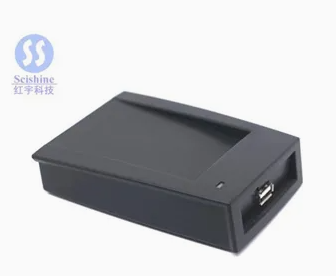
UHF-SRR1100U UHF桌面发卡器
Brief introduction
SRR1100U UHF Desktop Reader,integrates such as low power consumption technology,anti-collision algorithm,radio technology together and has perfect quality of anti-jamming.It keeps working with power up.DLL library software interfaces in line with Windows are provided to shorten user's time development.Reader integrates high-performance ceramic antenna,appearance,with USB interface,plug and play,easy to use and lightweight.
Main purpose
SRR1100U UHF Desktop Reader mainly used to read and write UHF tag data
Main function
1)Voice prompt:The module uses buzzer for voice prompt.When reading or writing the tag,the buzzer will beep
2)Power indication:With red Led in the top-right corner for power indication.
3)Reading tag data:Reader can read or write data of tag's every section.
4)Secondary-development:USB interface is used when connected to pc or controller for data exchange,we provide users the secondary-development kit.
Technical parameters
1)Power supply:USB power supply power supply:
2)Power:<2.5 watts
3)Antenna polarization mode:right-handed circular polarization
4)Working frequency:801~807Mhz 901-915 MHZ,jump frequency of 250 KHZ
5)Transmission power:15 DBM
6)Support agreement:EPC C1 GEN2/ISO 18000-6c
7)Identify distance:>50 cm
8)Write data range:5 cm
9)External interface,USB
10)Working life:more than 5 years
11)Working temperature:-20~+60ºC
12)Working humidity:less than 90%(condensation)
13)Dimensions:10.8cm×7.8cm×2.8cm
installed
SRR1100U reader and other objects placed on the desktop level surface can also be flexibly fixed based on actual usage.
Connection use
USB drive
Reader before first use need to connect to the PC,and install the USB drivers.When the reader first connected to a PC via a USB connection,you will be prompted to install the driver,Select"USB drive"folder of the driver,follow the system prompts to complete the installation.Follow the prompts to complete the installation.After the driver installation is successful,the virtual hardware resources of the system in a COM port,the port number will be used for PC communication with the reader.
Card Operation
Supporting Demo.exe reader application program is a demonstration routine,run the program to achieve the recognition of the label,reading,writing and other applications operating.
Secondary development
Users may need to use SRR1100U reader application development.We provide application development kit based on the C++language that supports VC++,C#,VB development environment.
Precautions
SRR1100U main body by the reader,USB communication line constituted.Each section should be protected.
1)Ensure proper connection interface;
2)Try to avoid collision with hard objects,such as scraping and sliding;
3)Reader circuit ESD protective treatment done,but the test and use,do not remove the main part of the reader